This server is using Minecraft 1.3.2, and is a vanilla bukkit server, no white list.
After working for like, a month on the server, I'm gonna make a thread for it so that people can talk about it and help me work on making it better, please post any problems or questions here.
Command List
/mcc - Will show you the available mcmmo commands, with mcmmo you can create parties to adventure and have a private party chat.
To create a party, type /party [party name], this will create a party. /invite [name] will invite that player to your party /accept to accept the invite /p toggles party chat /party q leaves current party /ptp [name] Lets you teleport to that party member HAS AN HOUR COOLDOWN, USE WITH CAUTION
Chimera wing - To use Chimera wing, you need 10 feathers, right click with 10 feathers will take you home. IF THERES ANYTHING ABOVE YOUR HEAD, YOU WILL TAKE DAMAGE, AND COULD POSSIBLE KILL YOU!
/help for help /rules will display the rules /near will show you who is near /ignore [name] will ignore target player
When you first join the server, you will start off in the Creative World Hub.
This area contains portals to each of the survival worlds, and to each main biome canvas setup for the terrain generator, to use the portals, just step onto the netherstone area and you will be teleported to that area.
The plugins on the server are built around using minimal amounts of in game commands, and relying on in game items as tools. The plugins we use are.
Assembly Line Furnace
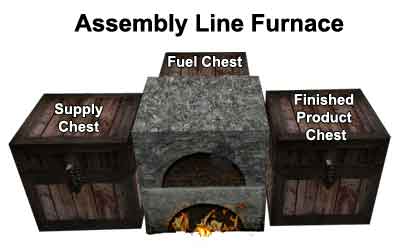
The ability to use chests to smelt your items automatically is unlocked when you become a Footman. The chest setup is like this.
How to use:
Build an Assembly Line Furnace in the configuration shown above. Load your Source Materials into the chest on the left. Load your Fuel supplies into the chest behind your Furnace then Left-Click on your furnace. Providing you have the appropriate permissions your Assembly Line Furnace will activate and you will receive a message in your chat window verifying this action. You can use a double chest for both the Supply Chest and the Finished Materials Chest.
Be away that you need to be in the same chunk as your furnace or else it won't smelt.
Giant Trees
The ability to grow your own giant trees is unlocked when you become a Knight. To grow a giant tree, you simply place a golden block next to a sapling.
Protection Stones
This plugin allows you to protect your lands simply by placing down certain ores, these ores can be purchased in Little Torch for emeralds. Currently the lands are
When you have your own land, you can set certain flags inside it. The most common ones to use are /ps flag use allow / deny (This allows people to open doors and use switches) /ps flag greeting -enter message- (This allows you to set a welcoming message on your land) /ps flag farewel -leaving message- (This allows you to set a leaving message when leaving your land) /ps flag chest-access allow / deny (This allows people to access your chests or not. /ps flag mob-spawning allow / deny (This prevents hostile mob spawn) /ps flag pvp allow / deny (This allows or denies pvp) /ps flag entry allow / deny (This allows you to keep people out of your area)
General Commands for when you own lands are
/ps add [player] (This lets you add people into your region list) /ps remove [player] (This removes a player from your region list) /ps hide (This hides your protection stone) /ps show (This shows your protection stone) /ps addowner (Adds an owner to your region) /ps removeowner (removes an owner in your region)
Shopkeepers allows players to spawn npcs that will act as a shopkeeper using vanilla minecraft trading, you can buy a shopkeeper egg in Little Torch, when you have the egg, throw it where you want it. Removing the shopkeeper will refund your egg. Here's a tutorial on how to setup a shop.
The creative world is free to do anything with, and the ranks barely effect this world. Players are freely able to use worldedit (If abused I will ban you) and use protection stones to a limit (can't use higher ranked, don't wanna claim all of the world)
The creative world has special area setup for the main biomes in the minecraft world. Players can create things on these canvases to have taken and made to spawn in the world naturally.
Example of the Desert Biome Canvas
The trees and pyramid have been taken and now spawn naturally in this world. The spawn rate can be configured, I made them spawn everywhere just so I could see if it was working.
Players can also create there own biome, including how the biome will spawn, in what shape, with what blocks, for example.
If you want your own custom biome, you will need to pm me exactly how you want it to generate, and supply me with the objects that would spawn in the biome. It will take some time to have it created.
I would like to be able to create a world that has things AZ created to generate everywhere, creating a whole world unique to AZ.
The survival world is separated into two parts. The Terra Lands, and the Sky Lands. Each are accessed through the creative world hub. Terra Lands houses the town of Little Torch, Skylands has Sky Torch, each has it's own unique things.
Little Torch is a small town in the Terra Lands. Little Torch currently has six points of interest.
Little Torch Blacksmith will purchase your diamonds and smelted ores Little Torch Butcher will purchase animal meats, and sell you animal eggs Little Torch Realty is where you can purchase Protection Ores Little Torch Farm is where you can sell Wool, Melons and Bread, and purchase seeds and sheep eggs Little Torch Orphanage is where you can buy your very own shopkeeper
Little Torch is always expanding, if you want to see an admin shop in here, build it in the creative world and describe what it will sell.
Sky Torch is in the Sky Lands, Sky Torch has five points of interest.
Sky Torch Blacksmith, located on the floating island, will purchase your redstone, lapis lazuli and Gold bars Sky Torch Library is always looking for feathers, books, and ink sacs for its library. Sky Torch Inn sells a variety of CDs and jukeboxes Sky Torch Bazaar currently has three stalls, one that sells flowers, one that sells bakery goods, and one that purchases fish, and sells squid eggs. And then there's the old man in the tree.
There are 10 main ranks for the survival world, and sub ranks for the skills you use in game.
The 10 main ranks are based off of your MCMMO powerlevel stat, which is all of your in game stats combined. You can increase these stats just by doing normal in game stuff, like mining and killing stuff. Your main rank will unlock more in game content.
The sub ranks are for your mcmmo skills, once you get your skills high enough you can unlock more things, like abilities for that skill.
Main Ranks
Citizen - 0 - Citizens are limited on what they can do. They cannot own shops, or place protection stones, nor can they empty buckets or lava or water and use tnt.
Mercenary -100- Mercenaries unlock the ability to use Coal Protection blocks, but can only own 1 piece of land. They also gain the ability to use Chimerawing, when you right click with 10 feather, will take you home.
Page -250- Pages can now own two lands, and can use redstone ore protection blocks. They will not be kicked when afk for too long, and can use buckets of water and lava.
Squire -500- Squires can own five lands
Footman -1000- Footmen can own seven lands, and can place glowing redstone protection blocks. They also gain the ability to use assembly furnace
Knight -2500- Knights can own ten lands, and can place lapis ore protection blocks. Knights can also grow giant trees.
Champion -4000- Champions can own fifteen lands, and can place the emerald protection block.
Vindicator -5500- Vindicators can own twenty lands, and can place Diamond protection blocks.
Paladin -7500- Paladins can own thirty lands
Seraph -9000- Seraphs can own unlimited amounts of land.
The ranks are subject to change after testing.
Skill Ranks
Rank 1 Mining -100- You gain the ability Super Breaker
Rank 2 Mining -125- You can the ability to blastmine and use tnt
Rank 3 Mining -150- You are a master at mining and can do all of the mining abilities, you gain double drops when you mine.
Rank 1 Woodcutting -100- You gain the ability Leafblower
Rank 2 Woodcutting -125- You gain the ability Tree Feller
Rank 3 Woodcutting -150- You are a master at being a lumberjack, and that's ok. You have a chance at double drops
Rank 1 Herbalism -100- You gain the green terra ability
Rank 2 Herbalism -150- You are a master at growing stuff, you gain all the abilities.
Rank 1 Excavation -100- You gain the ability giga drill breaker
Rank 2 Excavation -150- You are a master at digging holes, you can find treasure while digging.
Rank 1 Archery -50- You have a chance at recovering arrows.
Rank 2 Archery -150- You are a master at archery, and pew pew stuff dead.
Rank 1 Swords -100- Your attacks have a chance at making your target bleed.
Rank 2 Swords -125- You can counterattack
Rank 3 Swords -150- You are a master at swords, gaining the ability serrated strikes.
Rank 1 Axes -100- Your attacks have a chance to critically hit.
Rank 2 Axes -125- Your attacks have a chance to do greater impact, which has a chance to send targets flying.
Rank 3 Axes -150- You are a master at axes, unlocking all axes abilities, including Skull Splitter
Unarmed Rank 1 -50- You are a drunken master at punching bitches, go nuts.
Repair Rank 1 -25- You can now repair Stone and Bows
Repair Rank 2 -50- You can now repair iron and gold
Repair Rank 3 -75- You can now repair enchanted tools
Repair Rank 4 -100- Your training makes your repairs flawless, using less materials each time.
Repair Rank 5 -150- You are a master at repairing, able to repair anything. ANYTHING*
Acrobatics Rank 1 -100- Breaking your legs a hundred times makes you a master at acrobatics, allowing you to do a graceful cripple roll. Hold Shift while falling to have a chance to negate all damage while falling.
Last edited by Noffletoff on Tue Oct 02, 2012 1:28 pm, edited 5 times in total.
Post subject: Re: Nofflecraft, Revenge of the Toff
Posted: Mon Aug 27, 2012 5:28 pm
Joined: Tue Oct 21, 2008 9:42 am Posts: 6845 Location: satans buttcrack
its a poopy laptop and im not gonna spend cheddar on anything new until i move in with dark. he alrady said were getting a gaming computer once were living together. for now i just put up with a shitty computer
Post subject: Re: Nofflecraft, Revenge of the Toff
Posted: Mon Aug 27, 2012 8:26 pm
Joined: Tue Mar 29, 2011 9:22 am Posts: 1435
Theoretically, nothing the server does can lag your computer. It is only the players that are able to do so. If you throw loads of items/XP on the ground, then you will experience lag. Or if there are loads of leaves around, but the server and plugins can't actually create lag.
Users browsing this forum: No registered users and 4 guests
You cannot post new topics in this forum You cannot reply to topics in this forum You cannot edit your posts in this forum You cannot delete your posts in this forum You cannot post attachments in this forum
 Login
Login Register
 FAQ
FAQ Search